
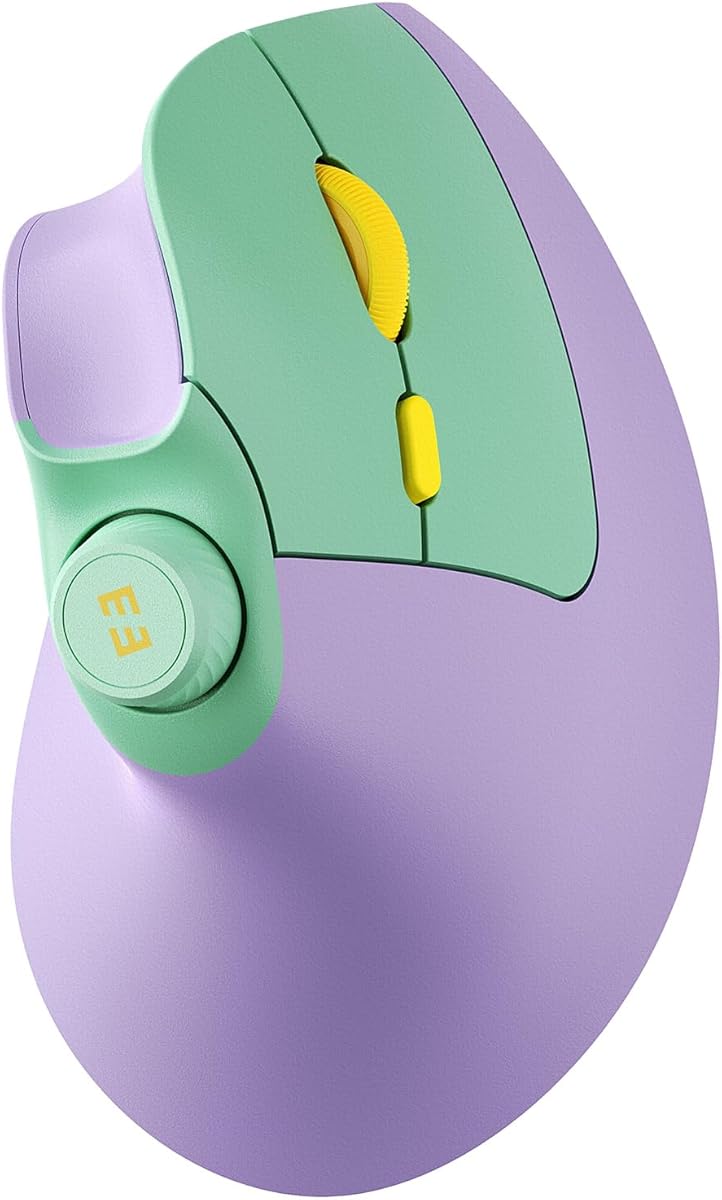
Anker 2.4G Wireless Ergonomic Mouse
4.2Editor score
800 to 1600 DPI
USB receiver included
Power saving mode
Discover the top 10 ergonomic mice for wrist pain tested for comfort and performance to help you choose the right vertical mouse for your needs.
Finding the right ergonomic mouse can significantly reduce wrist pain and improve your daily computer experience. These devices are designed to keep your hand in a natural position, minimizing strain on your forearm and carpal tunnel during long work sessions.
We compared ten top-rated vertical mice based on their design, connectivity options, battery life, and user feedback. Each product was evaluated for its ability to provide comfort and functionality across different hand sizes and operating systems.
Each pick in this guide highlights specific strengths such as silent clicks, rechargeable batteries, or multi-device support. Please note that availability and pricing may change, so checking current stock and details on the retailer site is recommended before purchase.
4.2Editor score

4.4Editor score

4.4Editor score
This side-by-side comparison helps you evaluate the key specifications and features of each vertical mouse to determine which best fits your ergonomic needs and workflow requirements.




The Logitech Lift Vertical is a standout choice for users seeking comfort and reliability. With a rating of 4.4 stars, it offers a 57 degree angle that aligns the wrist naturally reducing strain during extended use.
We may earn a commission when you buy through this link, at no additional cost to you.
Its ergonomic shape is designed for small to medium right hands ensuring a snug fit. The wireless connectivity options include Bluetooth Low Energy and Logi Bolt USB providing flexibility across Windows and Mac systems.
While the mouse excels in comfort the battery life is impressive at up to two years. However the lack of macro customization might be a drawback for power users needing complex workflows.
If you prioritize ergonomic health and ease of use this mouse is an excellent investment. It is particularly suited for office workers and remote professionals looking to mitigate wrist pain effectively.
The 57 degree tilt promotes a handshake position that reduces forearm twist and muscle tension significantly throughout the workday.
Plastic parts include certified post-consumer recycled material making this an eco-friendly choice without compromising on build quality.
We may earn a commission when you buy through this link, at no additional cost to you.
The Anker 2.4G Wireless is a cost effective solution for ergonomic needs. It features a scientifically designed structure that promotes a neutral wrist position reducing strain for daily computer tasks.
We may earn a commission when you buy through this link, at no additional cost to you.
With DPI levels ranging from 800 to 1600 users can adjust sensitivity for various surfaces. The USB receiver ensures a stable connection without requiring Bluetooth pairing which simplifies setup for many users.
While it lacks Bluetooth and silent clicks the mouse offers good precision and durability. The next and previous buttons are helpful for browsing though the click sounds may be noticeable in quiet environments.
This model is ideal for budget conscious buyers who need basic ergonomic support. It works well for general office work and is compatible with a wide range of Windows systems.
Multiple DPI settings allow users to switch between precise cursor control and faster movement depending on their specific task requirements.
The power saving mode activates after inactivity extending battery life and ensuring the mouse is ready when needed without constant manual management.
We may earn a commission when you buy through this link, at no additional cost to you.
The TECKNET 4800 DPI offers advanced features for a competitive price. It supports Bluetooth and USB modes allowing seamless switching between up to three devices for increased productivity.
We may earn a commission when you buy through this link, at no additional cost to you.
Its silent click design makes it suitable for libraries or shared offices. The vertical shape reduces wrist pressure and the adjustable DPI levels provide precision for detailed work or general navigation.
While it uses AAA batteries the long battery life and sleep mode help conserve power. The side buttons are not fully compatible with macOS which is a minor limitation for Apple users.
This mouse is a great choice for multitaskers needing versatility. It balances performance and ergonomics well making it a strong contender for daily use across different operating systems.
Users can switch between connected devices quickly with a simple button press enabling efficient workflows across laptops and desktops.
The near silent clicks prevent distractions in quiet environments ensuring a focused and peaceful workspace for everyone nearby.
We may earn a commission when you buy through this link, at no additional cost to you.
The UGREEN Ergonomic Wireless provides a balanced experience for general users. Its natural vertical position reduces muscle strain and the five button layout supports efficient browsing and navigation.
We may earn a commission when you buy through this link, at no additional cost to you.
With four adjustable DPI levels users can adapt to different tasks. The quiet clicks and PTFE glide feet ensure smooth and peaceful operation across various surfaces including wood and paper.
The dual connectivity options allow connection via Bluetooth or 2.4G wireless. While it uses an AA battery the smart sleep mode helps extend usage time between changes.
This mouse is suitable for anyone seeking comfort without high costs. It works well for office tasks and is compatible with a wide range of systems including Android and ChromeOS.
Durable glide pads reduce friction and allow the cursor to move effortlessly ensuring precise control during extended work sessions.
Users can switch between wireless modes to match their device setup ensuring reliable performance whether they use a laptop or desktop.
We may earn a commission when you buy through this link, at no additional cost to you.
The ProtoArc EM11 NL is designed specifically for users with small to medium hands. Its rechargeable battery eliminates the need for disposables and it offers dual connectivity for flexible setups.
We may earn a commission when you buy through this link, at no additional cost to you.
The ergonomic vertical design keeps the wrist straight which reduces discomfort. Users should allow a week to adjust to the shape as it differs significantly from standard mice.
With DPI levels up to 2400 it offers sufficient precision for most tasks. The silent clicks help maintain focus though side buttons may not work fully on macOS.
This mouse is ideal for those who prefer eco-friendly and compact options. It is a solid choice for professionals looking for comfort and convenience in a smaller package.
Designed for hands under 7.5 inches this mouse ensures a proper grip and reduces strain for users who find larger devices cumbersome.
Built-in battery with Type-C charging reduces waste and provides a sustainable way to power your device without constant battery replacements.
We may earn a commission when you buy through this link, at no additional cost to you.
The Lekvey Ergonomic Mouse offers a high-capacity battery that supports over 150 hours of use on a single charge. It features a scientific ergonomic design that encourages neutral wrist positions for smoother movement.
We may earn a commission when you buy through this link, at no additional cost to you.
Users can adjust sensitivity across three DPI levels to match their needs. The forward and back buttons are convenient for browsing and the mouse is compatible with most Windows and Linux systems.
It uses a USB receiver instead of Bluetooth which simplifies connection but limits wireless options. Some users may need a few days to adapt to the vertical shape fully.
This mouse is a great option for those who value longevity and convenience. It works well for general office work and provides comfortable support for medium to large hands.
No drivers or Bluetooth pairing are required allowing users to start using the mouse immediately after inserting the USB receiver.
Most customers report significant wrist pain reduction after a short adjustment period confirming the effectiveness of the vertical design.
We may earn a commission when you buy through this link, at no additional cost to you.
The TECKNET Rechargeable provides a robust solution for professionals. It features a 600mAh battery that lasts up to two months on a single charge and supports multi-device switching.
We may earn a commission when you buy through this link, at no additional cost to you.
The 52 degree vertical angle promotes a handshake grip that reduces strain. Six adjustable DPI levels ensure precision for tasks ranging from photo editing to general browsing.
Built to withstand 6 million clicks it is a durable option for daily use. The silent click technology minimizes noise which is beneficial for shared or quiet environments.
This mouse is perfect for users who need reliability and performance. Its versatile connectivity and high rating make it a top choice for those who work across multiple devices.
The mouse is built to withstand heavy usage with a lifespan of 6 million clicks ensuring it lasts through long periods of daily work.
Ultra-sensitive tracking ensures smooth movement across different surfaces allowing users to maintain accuracy during detailed tasks.
We may earn a commission when you buy through this link, at no additional cost to you.
The seenda MOU-302 stands out with a built-in volume knob for quick control without switching windows. It supports three device connections via Bluetooth and USB ensuring versatility for hybrid workers.
We may earn a commission when you buy through this link, at no additional cost to you.
The vertical design promotes a neutral wrist position reducing discomfort during long hours. Silent clicks and a rechargeable battery add to its convenience for daily office tasks.
With adjustable DPI levels it offers smooth control for various needs. The compatibility with iOS and Android makes it a universal solution for users with diverse devices.
This mouse is ideal for power users who need extra functionality. It balances ergonomic comfort with practical features like volume control making it efficient for multimedia tasks.
Streamers and remote workers benefit from the ability to adjust audio directly from the mouse improving workflow during video calls.
Seamless switching between tablets and desktops allows users to manage multiple screens without physical interruption.
We may earn a commission when you buy through this link, at no additional cost to you.
The Logitech MX Vertical is a top-tier option for those seeking premium ergonomic comfort. It reduces muscular activity by 10 percent and features a natural handshake position supported by leading ergonomists.
We may earn a commission when you buy through this link, at no additional cost to you.
With a 4000 DPI sensor it offers four times less hand movement compared to standard mice. The cursor speed switch allows instant adjustments between accuracy and speed for different tasks.
The textured rubber surface ensures a natural grip and the thumb rest is positioned comfortably. While the price is higher the performance and health benefits justify the investment.
This mouse is best suited for professionals who prioritize health and precision. It is a long-term solution for reducing wrist strain without compromising on performance.
The high precision sensor ensures accurate cursor control even during rapid movements making it ideal for detailed design work.
Designed and tested with criteria set by leading ergonomists it ensures the mouse meets rigorous standards for health and comfort.
We may earn a commission when you buy through this link, at no additional cost to you.
The TECKNET 2.4G offers a 60 degree vertical grip that aligns the forearm naturally. It includes six programmable buttons that can speed up workflows and reduce repetitive click fatigue.
We may earn a commission when you buy through this link, at no additional cost to you.
With five adjustable DPI levels it offers flexibility for various tasks. The USB receiver ensures a stable connection and the silent design helps maintain a focused workspace.
Users may need a few days to adjust to the shape as it corrects years of poor posture. The reliable wireless technology ensures consistent performance without interference.
This mouse is a solid choice for those seeking reliability and customization. Its programmable buttons and ergonomic design make it a practical tool for improving office productivity.
Thumb shortcuts reduce repetitive motion by allowing quick access to common actions enhancing workflow efficiency.
The interference-free wireless technology ensures reliable performance up to 10 meters away from your device.
We may earn a commission when you buy through this link, at no additional cost to you.
Selecting the right ergonomic mouse involves considering factors such as hand size, connectivity, and specific features that suit your workflow and health needs.
Choosing a mouse that matches your hand length is crucial for comfort. Some models are designed for small to medium hands while others fit larger grips better. Measure your hand from wrist to tip of the middle finger to find the best match.
A proper fit ensures the palm rests naturally without overreaching which reduces strain on the wrist and forearm.
The vertical angle of the mouse determines how natural the handshake position feels. Angles around 57 to 60 degrees are common and effective for reducing pronation.
Look for a mouse with an angle that feels comfortable for your daily tasks and allows for long use without pain.
Decide between Bluetooth and USB receiver based on your device setup. Bluetooth allows for cleaner desk space and multi-device switching while a receiver ensures stable connection on systems without Bluetooth.
Multi-device connectivity is useful if you switch between a laptop and a desktop frequently during your workday.
Rechargeable models offer convenience and reduce waste while battery-operated ones can be more portable. Check the estimated usage time to ensure it meets your daily needs.
Long battery life means less interruption and consistent performance over weeks or months.
Higher DPI settings allow for precise cursor control which is beneficial for detailed work. Look for adjustable DPI levels to match different tasks from browsing to design.
A reliable sensor ensures smooth tracking on various surfaces without jitter or lag.
Silent clicks are ideal for quiet environments like libraries or shared offices. They help maintain focus without distracting noise.
If you prefer tactile feedback standard clicks may be more satisfying but consider your workspace when choosing.
Ensure the mouse works well with your operating system especially if you use macOS or Linux. Some side buttons may have limited functionality on non-Windows systems.
Check the product details for system requirements before purchasing to avoid compatibility issues.
A solid warranty indicates confidence in product durability. Look for at least one year of coverage and responsive customer support.
Good support ensures you can resolve any issues quickly and continue working without extended downtime.
Start by placing the mouse on a clean and flat surface. Ensure your hand rests naturally on the grip without lifting your wrist off the desk to maintain the ergonomic angle.
Take short breaks every hour to stretch your fingers and wrists. This helps reduce stiffness and keeps your muscles relaxed during long sessions of work.
Clean the mouse regularly with a soft dry cloth. Avoid using harsh chemicals or excessive water to prevent damage to the buttons and sensors.
A vertical mouse keeps your hand in a neutral handshake position reducing rotation and muscle strain on the forearm. This alignment helps prevent repetitive stress injuries by maintaining a natural posture during use.
Most users need a few days to adjust to the different grip. With regular use your muscles adapt and you will find it more comfortable than a standard mouse over time.
While vertical mice are optimized for productivity some offer high DPI and precise tracking suitable for casual gaming. However specialized gaming mice might be better for competitive play.
Most vertical mice are designed for right-handed use but some models are available for left-handed users. Check the product description to ensure compatibility with your dominant hand.
Many vertical mice use optical sensors that work well on most surfaces including wood and paper. However using a mouse pad can improve tracking and smoothness for better performance.
Bluetooth reduces clutter and supports multi-device switching while a receiver offers stable connection on older systems. Choose based on your device capabilities and personal preference.
It is recommended to take a short break every hour to stretch and move around. Regular breaks help prevent stiffness and promote better overall wrist health during long work sessions.
Choosing the right ergonomic mouse can make a significant difference in your daily comfort and productivity. The options in this guide offer a range of features from silent clicks to advanced tracking capabilities.
Prioritize factors like hand size and connectivity to find a match that suits your workflow. Whether you prefer a rechargeable model or a simple receiver the best choice depends on your specific needs.
Remember to check current prices and availability before purchasing as details may change. Investing in a quality ergonomic mouse is a step toward long-term wrist health and efficient work habits.