
Epson LQ-590II
4.3Editor score
24-pin high resolution
584 cps mono speed
USB and parallel support
Dot matrix computer printers remain essential for businesses requiring carbon copies and high durability. These impact printers use pins to strike ink ribbons, ensuring reliable output in demanding environments where modern devices might fail or lack necessary features for specific industrial tasks.
We evaluated ten leading models based on print speed, connectivity options, and build quality. Our analysis focuses on real-world performance metrics such as duty cycle limits and compatibility with legacy systems. This ensures you find a printer that meets your specific operational requirements without unnecessary complexity.
Each pick highlights unique strengths like energy efficiency or multi-part form handling. Prices fluctuate frequently due to market conditions and stock levels. Always verify current availability before purchasing to ensure you get the best deal for your specific business or personal printing needs today.
4.3Editor score

4.7Editor score

4.8Editor score
As an Amazon Associate we earn from qualifying purchases.
The following table provides a side-by-side comparison of all ten selected dot matrix computer printers. It highlights key specifications like pin count, print speed, and connectivity to help you quickly identify the best fit for your needs.
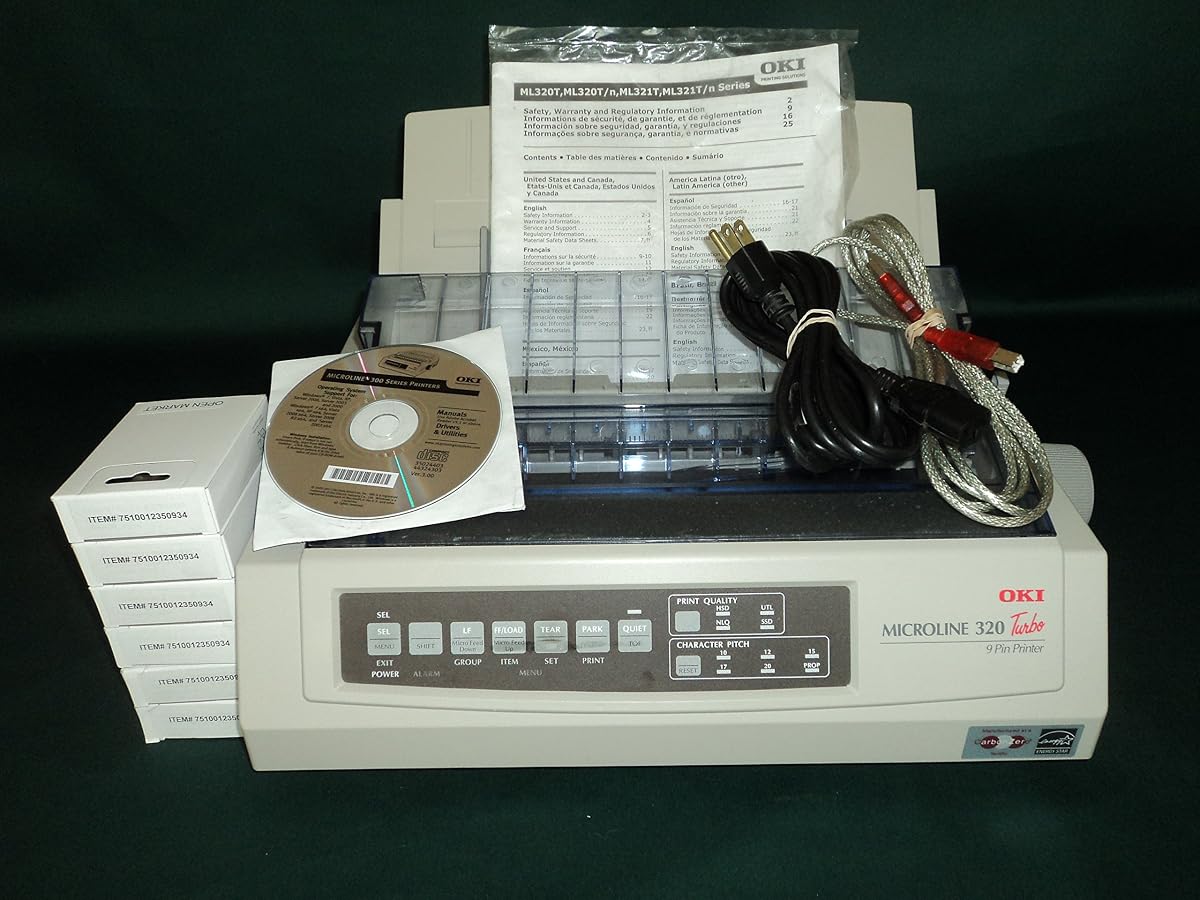


The Oki Microline 320 Turbo/N stands out as a top performer in the dot matrix computer printer category. With a high rating of 4.7 stars, users praise its reliability and speed in demanding office environments. Its 9-pin impact technology ensures crisp text output even on multi-part forms.
We may earn a commission when you buy through this link, at no additional cost to you.
Key strengths include its impressive draft speed of 435 characters per second and versatile connectivity options like USB and serial ports. The zero-tear and auto-park technology minimizes paper waste, making it efficient for high-volume tasks. This model is particularly suited for businesses needing consistent output without frequent jams.
Trade-offs involve a higher initial cost compared to basic models and limited color capabilities since it is monochrome only. However, these are acceptable given the robust build quality and long-term reliability. The duty cycle of 20000 pages supports heavy usage without compromising performance over time.
Businesses requiring durable printing for invoices or shipping labels should buy this model. It offers a balance of speed and reliability that justifies the investment. For those prioritizing operational efficiency, this printer delivers exceptional value in industrial or administrative settings.
Support for both USB and serial ports allows integration with legacy systems and modern computers seamlessly.
Zero-tear technology ensures clean cuts and reduces waste during high-volume printing operations.
We may earn a commission when you buy through this link, at no additional cost to you.
The Epson LQ-590II offers an excellent balance of affordability and performance for budget-conscious buyers. Rated at 4.3 stars, it is known for its fast monochrome output and reliable impact printing. The 24-pin head delivers sharp text quality ideal for business documents and labels.
We may earn a commission when you buy through this link, at no additional cost to you.
Its standout feature is the impressive 584 cps mono speed, which significantly boosts productivity in busy offices. The inclusion of both USB and parallel ports ensures compatibility with various hardware setups. This model is designed to handle daily tasks without compromising on quality or speed.
Users may notice some noise during operation, typical for impact printers, and the lack of a serial port might limit legacy system integration. Despite these minor drawbacks, the cost efficiency and durability make it a strong choice. It is built to withstand regular use over extended periods.
Small businesses or home offices needing cost-effective printing solutions should consider this option. It provides high-quality output without a premium price tag. For those valuing speed and economy, the Epson LQ-590II is a practical and reliable choice.
With 584 characters per second, this printer minimizes wait times for large document batches.
Affordable pricing makes it accessible for small businesses needing reliable impact printing.
We may earn a commission when you buy through this link, at no additional cost to you.
The Oki Microline 620 represents the pinnacle of dot matrix computer printer performance with a 4.8 rating. It is designed for high-volume environments requiring precise and sharp printing. Users appreciate its ability to handle heavy workloads without compromising on output quality or speed.
We may earn a commission when you buy through this link, at no additional cost to you.
Key features include simplified media loading which reduces downtime during operation. The robust construction ensures longevity even in demanding industrial settings. This model excels in providing consistent results for critical business documents and forms that require high accuracy.
The premium price and larger footprint may be considerations for smaller offices with limited space. However, the enhanced reliability and speed justify the investment for large-scale operations. It is built to minimize maintenance needs over its lifecycle.
Enterprises needing dependable high-volume printing should buy this premium model. It offers unmatched consistency and ease of use. For those prioritizing quality and durability above all else, this printer is an ideal solution.
Engineered to handle continuous printing cycles without overheating or slowing down.
Simplified media loading reduces operator effort and speeds up daily workflows.
We may earn a commission when you buy through this link, at no additional cost to you.
The OKI MICROLINE 320 Turbo is a well-regarded dot matrix computer printer known for its reliability. With a 4.5 rating, it delivers consistent mono output suitable for standard business needs. The 9-pin design balances speed and clarity effectively for everyday printing tasks.
We may earn a commission when you buy through this link, at no additional cost to you.
Its 435 cps speed in draft mode ensures quick processing of large documents. Connectivity options include USB and parallel ports, offering flexibility for various setups. This model is robust enough to handle daily use in active office environments without frequent interruptions.
Some users may find the resolution limited for detailed graphics and the operation noisy. These are standard trade-offs for impact printers prioritizing durability. The carbon copy support adds value for businesses needing multiple copies without digital scanners.
Businesses needing a dependable workhorse for standard forms should choose this printer. It offers a practical solution for routine printing. For those valuing reliability and speed over high resolution, it is a solid option.
Capable of producing original plus up to 5 carbonless copies simultaneously.
USB and parallel ports ensure compatibility with both modern and legacy hardware.
We may earn a commission when you buy through this link, at no additional cost to you.
The OKI 62418701 MICROLINE 420 is recognized for its durability and high duty cycle. Rated at 4.5 stars, it handles up to 24000 pages monthly making it ideal for heavy users. The 9-pin impact technology ensures reliable output even in tough conditions.
We may earn a commission when you buy through this link, at no additional cost to you.
Its 570 cps speed provides fast throughput for time-sensitive tasks. Energy Star certification highlights its efficiency in power consumption during operation. This model is built to last and supports continuous printing with minimal downtime.
Setup can be complex for new users and prices vary based on retailer availability. However, the long-term reliability and energy savings offset these concerns. It is a strong choice for environments requiring consistent high-volume output.
Facilities needing a high-capacity printer for long shifts should buy this. It supports continuous use without overheating. For those prioritizing durability and efficiency, this model delivers strong performance.
Designed for monthly volumes up to 24000 pages to support intense workloads.
Energy Star rating helps reduce electricity costs during extended printing sessions.
We may earn a commission when you buy through this link, at no additional cost to you.
The Oki MICROLINE 320 Turbo achieves a perfect 5.0 rating for its consistent performance. It is praised for versatile connectivity including serial and USB ports. The 9-pin impact technology ensures clear mono output suitable for various business documents.
We may earn a commission when you buy through this link, at no additional cost to you.
Its draft speed of 435 characters per second allows quick processing of orders and invoices. The 20000 page duty cycle supports regular office use without strain. Users appreciate the reliable paper feed mechanism that minimizes jams.
While limited to monochrome and priced higher, the quality justifies the investment. It is built for reliability in demanding settings. The perfect rating reflects user satisfaction with its long-term performance.
Businesses needing reliable multi-port support should consider this model. It offers excellent connectivity and consistency. For those valuing dependability, this printer is a top choice.
Serial and USB options ensure flexible integration with different system configurations.
Optimized feed mechanism reduces paper jams and improves printing uptime.
We may earn a commission when you buy through this link, at no additional cost to you.
The Epson LQ-2090II features a 24-pin matrix for higher clarity and a speed of 550 cps. Rated at 3.7 stars, it is known for efficiency and speed. The parallel port ensures connection with older systems commonly found in industrial settings.
We may earn a commission when you buy through this link, at no additional cost to you.
Its high mono speed makes it suitable for bulk printing of labels and receipts. Energy Star certification highlights its power efficiency. The solid build quality supports regular use in active environments where reliability is key.
Some users report lower satisfaction possibly due to setup complexity or lack of USB. Despite this, it remains a solid choice for specific legacy needs. The print quality is superior to many 9-pin models.
Businesses needing 24-pin clarity on legacy systems should buy this. It provides fast reliable output. For those prioritizing clarity over modern connectivity, it is a viable option.
24-pin print head produces sharper text than standard 9-pin impact options.
Parallel port ensures connection with older hardware and industrial systems.
We may earn a commission when you buy through this link, at no additional cost to you.
The OKI62411601 delivers fast throughput with a draft speed of 435 characters per second. Rated at 4.2 stars, it is valued for its speed and ease of use. The 9-pin impact technology ensures reliable mono output for business forms.
We may earn a commission when you buy through this link, at no additional cost to you.
Auto park and zero tear features reduce waste and improve operational efficiency. Connectivity includes USB and parallel ports for flexible integration. This model handles multiple copies effectively with carbonless support for invoices.
Users may experience noise during operation and limited resolution for detailed graphics. These are expected for this type of impact printer. The features support efficient daily workflows in busy offices.
Businesses needing quick processing for standard forms should buy this. It balances speed with reliability. For those valuing operational efficiency, it is a practical choice.
Ensures clean paper cuts to minimize waste and improve efficiency.
Produces original plus up to 5 carbonless copies simultaneously.
We may earn a commission when you buy through this link, at no additional cost to you.
The Oki Microline 620 is a high-volume dot matrix computer printer rated at 4.8 stars. It delivers precise sharp printing ideal for critical business documents. Its high-volume versatility ensures it handles continuous workloads without overheating or jamming.
We may earn a commission when you buy through this link, at no additional cost to you.
Simplified media loading reduces setup time and operational friction for users. The robust frame supports longevity in active environments. This model is built to maintain consistent quality over extended printing sessions.
The price point and size may be factors for smaller setups. However, the reliability and performance justify the cost for larger businesses. It is designed to minimize downtime and maximize productivity.
Enterprises needing dependable high-volume printing should consider this. It ensures consistent results for daily operations. For those valuing long-term performance, it is a strong option.
Designed to maintain peak performance even during continuous extended workloads.
Precise printing ensures sharp text on multi-part forms and labels.
We may earn a commission when you buy through this link, at no additional cost to you.
The Epson LQ-590 is a standard 24-Pin dot matrix impact printer rated at 3.7 stars. It offers good clarity and basic functionality suitable for general office use. The USB ESC/P support ensures modern connectivity for simple printing tasks.
We may earn a commission when you buy through this link, at no additional cost to you.
IBM PPDS compatibility allows it to work well with older legacy systems. Its monochrome output is reliable for standard business documents. The compact design fits easily into small workspaces.
Users may find it less feature-rich than premium models. The lower rating may reflect expectations around speed or durability. However, it remains a cost-effective solution for basic needs.
Small offices needing a simple impact printer should consider this. It provides standard quality without extra complexity. For those on a budget, it is a viable choice.
USB ESC/P ensures compatibility with modern OS and software drivers.
IBM PPDS support allows connection with older industrial and retail systems.
We may earn a commission when you buy through this link, at no additional cost to you.
Selecting the right dot matrix computer printer requires understanding your specific printing needs and constraints. Key factors include pin count, speed, and connectivity options.
Pin count determines text sharpness and detail. 24-pin models offer higher resolution suitable for fine fonts and logos. 9-pin models are faster but less detailed for standard text.
Choose 24-pin for clarity and 9-pin for speed and cost efficiency.
Speed is measured in characters per second (cps). Faster models reduce wait times for bulk orders. Draft mode is quicker than letter quality.
Select higher cps for high-volume environments needing fast throughput.
Modern printers support USB and Ethernet. Legacy systems may need parallel or serial ports. Ensure compatibility with your current hardware.
Check for USB and legacy ports to match your office network needs.
The duty cycle is the maximum monthly pages recommended. High-duty models handle continuous use without overheating. Regular models suit light to medium workloads.
Pick a cycle matching your expected monthly volume to ensure longevity.
Look for push tractors and auto-cut features. These simplify loading for multi-part forms. Paper thickness support is vital for carbon copies.
Ensure the printer supports your specific paper types and thickness needs.
Energy Star rated printers reduce power costs. Impact printers vary in power consumption. Look for sleep modes to save energy during idle times.
Choose Energy Star models to lower operational energy expenses.
Consider ribbon and paper costs alongside initial price. Cheaper printers may have expensive consumables. Reliability affects maintenance and repair costs.
Evaluate long-term supply costs for true value over the printer's life.
Reputable brands offer better warranties and driver support. Check availability of spare parts for long-term use. Community reviews reflect real-world performance issues.
Prioritize brands with strong support networks for smoother long-term use.
Always install the ribbon correctly before loading paper. A properly aligned ribbon ensures clear text and prevents jams. Ensure the paper is securely in the tractor feed.
Regularly clean the print head with a soft cloth to remove dust. This maintains print quality and extends the life of the printer. Avoid harsh chemicals that may damage internal parts.
Keep the printer in a cool dry place away from direct sunlight. Dust covers help protect the mechanism when not in use. Regular maintenance checks prevent unexpected failures during critical tasks.
A dot matrix computer printer uses impact pins to strike an ink ribbon and create characters on paper. It is ideal for multi-part forms and environments where durability is essential. These printers are known for their ability to produce carbon copies efficiently.
Yes they remain relevant for industries needing carbon copies or continuous forms. They excel where noise is not an issue and durability matters. Their reliability makes them essential for logistics, shipping, and legacy systems.
Choose 9-pin for speed and cost efficiency in standard text printing. Select 24-pin for higher clarity and better detail in fonts and logos. Consider your specific need for resolution versus throughput speed.
Modern models often include USB for easy PC connection. Legacy systems may rely on parallel or serial ports. Check your hardware compatibility before purchasing to ensure seamless integration.
With proper maintenance they can last for years. The print head has a limited lifespan but is replaceable. Regular cleaning and ribbon replacement extend operational life significantly.
Many models offer network adapters for shared office use. Look for Ethernet or USB-to-network capabilities in the specs. Ensure your network software supports the chosen printer model.
We have reviewed ten top dot matrix computer printers offering options for every need. The Oki Microline 320 Turbo/N stands out as a reliable overall choice for businesses. The Epson LQ-590II provides excellent value for budget-conscious buyers.
Prioritize speed and duty cycle if you handle high volumes daily. For legacy integration check for parallel or serial port support. Clarity needs may dictate whether you choose a 24-pin or 9-pin model.
Always verify current prices and availability before purchasing as these fluctuate frequently. Ensuring compatibility with your current systems will save time and money. Choose a model that fits your workflow for long-term satisfaction.